

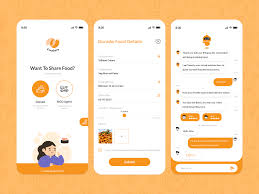
Food waste and hunger remain two of the biggest challenges worldwide. While millions of people struggle to access nutritious meals, large quantities of edible food are wasted every day by restaurants, households, events, and grocery stores. Food donation apps bridge this gap by connecting food donors with NGOs, shelters, volunteers, and individuals in need. However, the success of such platforms depends heavily on how user-friendly they are.
A user-friendly food donation app ensures seamless interactions, encourages consistent participation, and builds trust among donors and recipients. In this article, we explore how to build a user-friendly food donation app by focusing on design, features, technology, and user experience.
1. Understand Your Users and Their Needs
The first step in building a user-friendly food donation app is understanding the core user groups. Typically, these include:
-
Food donors: Restaurants, hotels, caterers, households, supermarkets, and event organizers
-
NGOs and shelters: Organizations responsible for food distribution
-
Volunteers and delivery partners: Individuals who collect and distribute food
-
Recipients: People or communities in need
Each group has different goals and expectations. Donors want quick and hassle-free food listing, NGOs need efficient request management, and volunteers want optimized routes and real-time updates. Conducting user research, surveys, and interviews helps identify pain points and expectations, ensuring your app design aligns with real-world needs.
2. Prioritize Simple and Intuitive UI/UX Design
User interface (UI) and user experience (UX) play a vital role in determining how easily users can navigate and use your app. A clean, intuitive design encourages engagement and reduces friction.
Key UI/UX best practices include:
-
Minimalistic layout with clear navigation
-
Simple onboarding process
-
Easy-to-read fonts and high-contrast colors
-
Clear call-to-action buttons
-
Logical information hierarchy
A clutter-free interface ensures that users can list food, accept requests, or track deliveries in just a few taps. Accessibility features like voice commands, language selection, and large icons also help improve inclusivity.
3. Streamline the Onboarding and Registration Process
A complex registration process can discourage users from completing sign-ups. To build a user-friendly food donation app development, the onboarding experience must be fast and intuitive.
Best practices include:
-
Social login and OTP-based authentication
-
Minimal data entry during sign-up
-
Role-based onboarding (donor, NGO, volunteer)
-
Simple tutorials explaining app usage
By reducing friction during onboarding, you increase user retention and encourage more people to participate in food donation efforts.
4. Implement Essential Features for Seamless Functionality
A user-friendly food donation app must include well-designed features that make the donation and distribution process efficient.
Key Features to Include:
a) Food Listing & Donation Requests
Donors should be able to easily list surplus food by entering quantity, food type, location, and expiry time. NGOs and recipients should be able to browse available donations and request pickups instantly.
b) Real-Time Notifications & Alerts
Push notifications keep users informed about donation matches, pickup schedules, and urgent food requests. Real-time alerts ensure quick action, preventing food spoilage.
c) Geo-Location & Smart Matching
Location-based matching connects donors with nearby NGOs and volunteers, reducing travel time and ensuring faster food distribution.
d) Pickup Scheduling & Tracking
Integrated tracking allows donors and NGOs to monitor food pickups in real time, increasing transparency and reliability.
e) In-App Chat & Communication
Direct messaging simplifies coordination between donors, volunteers, and recipients, minimizing confusion and delays.
5. Focus on Speed, Performance, and Reliability
Users expect fast and reliable app performance. Slow loading times or frequent crashes can discourage engagement and reduce trust.
To ensure optimal performance:
-
Use cloud-based infrastructure for scalability
-
Implement caching mechanisms
-
Optimize backend APIs
-
Conduct regular performance testing
A responsive and fast app improves user satisfaction and ensures smooth donation workflows.
6. Ensure Strong Data Security and Privacy
Food donation apps handle sensitive user data such as location, contact information, and transaction history. Ensuring robust security builds trust and credibility.
Best practices include:
-
End-to-end encryption
-
Secure authentication methods
-
Role-based access control
-
Compliance with data protection regulations
A secure platform encourages more users to participate confidently, knowing their data is protected.
7. Integrate Smart Logistics and Route Optimization
Logistics play a critical role in food donation efficiency. Integrating AI-powered route optimization helps volunteers and delivery partners choose the fastest and most efficient pickup routes.
This ensures:
-
Reduced delivery time
-
Lower fuel consumption
-
Improved food freshness
-
Increased operational efficiency
Smart logistics features significantly improve the overall user experience and impact.
8. Leverage AI and Analytics for Better Decision-Making
Artificial intelligence and analytics enhance app usability and efficiency. AI-powered systems can predict demand patterns, recommend donation matches, and optimize supply chains.
Analytics dashboards for NGOs and administrators help monitor:
-
Donation volumes
-
Distribution performance
-
Volunteer efficiency
-
Food waste reduction metrics
These insights help improve operations and drive continuous improvement.
9. Provide Multi-Language & Accessibility Support
To maximize reach, your app should support multiple languages and accessibility features. This ensures inclusivity and encourages participation from diverse communities.
Accessibility options such as voice commands, screen readers, and adjustable text sizes make the app usable for individuals with disabilities or low digital literacy.
10. Test, Iterate, and Improve Continuously
A user-friendly food donation app is not built overnight. Regular testing and iteration are essential to improving performance, usability, and feature relevance.
Use methods such as:
-
Usability testing
-
Beta user feedback
-
A/B testing
-
Continuous app monitoring
User feedback provides valuable insights into real-world challenges and helps refine the product.
11. Ensure Scalability for Future Growth
As your platform gains traction, user numbers and data volumes will grow. Scalable architecture ensures that the app can handle increased traffic without performance issues.
Cloud-based deployment, microservices architecture, and modular development enable seamless expansion and feature upgrades.
12. Build Trust Through Transparency and Community Engagement
Trust is the foundation of any donation-based platform. Providing transparent transaction histories, impact reports, and success stories helps build confidence among users.
Gamification elements such as badges, milestones, and contribution statistics motivate users and foster a sense of community engagement.
Conclusion
Building a user-friendly food donation app requires a perfect balance of simplicity, performance, security, and meaningful features. By focusing on intuitive design, seamless workflows, real-time tracking, smart logistics, and AI-powered insights, you can create a platform that genuinely makes a difference.
A well-designed food donation app not only reduces food waste but also contributes to social good by feeding those in need. With thoughtful planning, modern technologies, and continuous user feedback, your food donation platform can become a powerful tool for social impact and community empowerment.